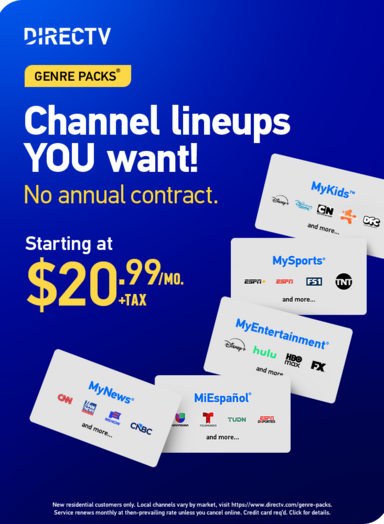

With eligible DIRECTV Genre Packs®, you have access to top-tier streaming services that are ready to go with a quick and easy setup. It only takes a few steps to get everything connected, so you can start watching right away.
Find your Genre Pack (MySports, MyEntertainment, MiEspañol, MyKids or MyNews) below and follow the instructions to get everything connected.
MySports®
MySports is built for fans who want access to live games, highlights and sports coverage all in one place. Along with your channels, you can also sign in to ESPN+ using your DIRECTV account.
Activate ESPN Unlimited
You can activate ESPN Unlimited from your email or your DIRECTV account and finish setup on ESPN’s site.
Follow these steps:
- Check your inbox for an activation email from DIRECTV with instructions on how to set up your ESPN Unlimited account -OR- sign in to your DIRECTV account and go to My TV Package.
- Select the Activate ESPN Unlimited link (or use the activation link sent to your email)
- Follow the steps on the ESPN website to create a new account, or sign in with your existing ESPN login
Good to know:
- You’ll need to complete activation before you can access ESPN Unlimited content in the ESPN app
- You’ll create a separate ESPN login during setup, which does not need to match your DIRECTV user ID
- If you already have an ESPN account, you can use your existing login during activation
- Emails are re-sent if you haven’t completed activation setup, and you can always find the link in your DIRECTV account
Already paying for ESPN Unlimited?
Following these steps will activate an additional subscription and will not replace any existing subscriptions. Accounts must be managed separately.
MyEntertainment®
MyEntertainment brings together a wide mix of shows, movies and originals across different streaming services, all connected through your DIRECTV account. Disney+ and Hulu (with ads), AMC+ (with ads), and HBO Max Basic With Ads are included in MyEntertainment; all you need to do is activate!
Activate Disney+ and Hulu bundle
You can activate your Disney+ and Hulu (both with ads) bundle from your email or your DIRECTV account and finish setup on Disney’s site.
Follow these steps:
- Check your inbox for an activation email from DIRECTV with instructions on how to set up your MyDisney account – OR – Sign in to your DIRECTV account and go to Manage TV Package
- Select the Activate Disney+, Hulu bundle link
- Follow the instructions on the Disney website to complete setup
Good to know:
- You’ll need to complete activation before you can access content in the Disney+ or Hulu app
- You’ll create a separate MyDisney login during setup, which does not need to match your DIRECTV user ID
- If you already have a MyDisney account, you can use your existing login during activation
- Emails are re-sent if you haven’t completed activation setup, and you can always find the link in your DIRECTV account
Already paying for Disney+ or Hulu?
Following these steps will activate an additional subscription and will not replace any existing subscriptions. Accounts must be managed separately.
Sign in to AMC+
Following these steps will activate an additional subscription and will not replace any existing subscriptions. Accounts must be managed separately.
Follow these steps:
- Simply download the AMC+ app
- Select DIRECTV as your provider and sign in with your DIRECTV user ID and password
Good to know:
- An AMC+ subscription can access programming on the DIRECTV app or on directv.com under the On Demand menu, select Networks, locate and select AMC+.
- Your DIRECTV subscription must remain active to keep access
- MyEntertainment customers with AMC+ (with ads) included in their Genre Pack can upgrade to order AMC+ Premium (no ads) at a discounted rate.
Already paying for AMC+?
Following these steps will not replace any existing subscriptions. Accounts must be managed separately.
Sign in to HBO Max
HBO Max Basic With Ads is available to MyEntertainment subscribers outside of the 5-day free trial period.
Follow these steps:
- Download and launch the HBO Max app or go to hbomax.com/provider
- Select DIRECTV as your provider and sign in with your DIRECTV user ID and password
- Set up your HBO Max profile and start streaming
Good to know:
- Only one HBO Max account can be used per DIRECTV account
- Your DIRECTV subscription must remain active to keep access
Already paying for HBO Max?
Following these steps will not replace any existing subscriptions. Accounts must be managed separately.
MiEspañol®
MiEspañol offers a variety of Spanish-language programming, including series, movies, news and more, all in one place. MiEspañol subscribers also have access to ViX Premium (with ads).
Sign in to ViX Premium (with ads)
Follow these steps:
- Download and launch the ViX app or go to vix.com/es-es/directv
- Select DIRECTV as your provider and sign in with your DIRECTV user ID and password
- Set up your ViX profile and start streaming
Good to know:
- Only one ViX account can be used per DIRECTV account
- Your DIRECTV subscription must remain active to keep access
Already paying for ViX?
Following these steps will not replace any existing subscriptions. Accounts must be managed separately.
MyKids™
MyKids is designed with younger viewers in mind, with access to family-friendly shows, movies and well-known characters. With MyKids, you can activate Disney+ through your DIRECTV account and start watching across your devices.
Activate Disney+
You can activate your Disney+ (with ads) from your email or your DIRECTV account and finish setup on Disney’s site.
Follow these steps:
- Check your inbox for an activation email from DIRECTV with instructions on how to set up your MyDisney account – OR – Sign in to your DIRECTV account and go to Manage TV Package
- Select the Activate Disney+ link
- Follow the instructions on the Disney website to complete setup
Good to know:
- You’ll need to complete activation before you can access content in the Disney+ app
- You’ll create a separate MyDisney login during setup, which does not need to match your DIRECTV user ID
- If you already have a MyDisney account, you can use your existing login during activation
- Emails are re-sent if you haven’t completed activation setup, and you can always find the link in your DIRECTV account
Already paying for Disney+?
Following these steps will activate an additional subscription and will not replace any existing subscriptions. Accounts must be managed separately.
MyNews®
MyNews keeps you connected with live coverage, breaking stories and in-depth reporting from a range of news sources.
At this time, there are no additional streaming services that require activation with this Genre Pack, but make sure to check back for updates!
Bringing It All Together
Once you’ve activated or signed in, your Genre Pack opens the door to even more premium content beyond your channel lineup. From live sports and breaking news to movies, series and family favorites, it’s all within reach.
This will not replace any existing Disney+, Hulu, ESPN, or Disney bundle subscription you may already have. All other accounts must be managed separately. You must remain on an eligible plan to retain your offer.