

HBO Max through DIRECTV
Learn how to get and access HBO Max through DIRECTV plus additional support, app and channel info.

HBO Max through DIRECTV offers access to the most talked about shows and movies featuring the worlds of HBO, the DC Universe, Harry Potter, and beyond.
DIRECTV offers the following HBO Max plan options:
- HBO Max Standard, no ads access to HBO channels in your TV guide, On Demand content and the HBO Max app.
- Available as a standalone add-on or includes with Signature PREMIER package.
- Customers who stream DIRECTV that pay by Roku can only get HBO Max Standard via the Signature PREMIER package.
- HBO Max Basic with Ads access to exclusive content in the HBO Max app only.
- Included in MyEntertainment Genre Pack.
- Available as a standalone add-on with Signature and other Genre packs.
- Not available as an add-on to customers who pay by Amazon, Roku or Google.
Note: Due to contractual obligations customers in a free trial are unable to access the HBO Max App, HBO linear channels or on-demand content until the trial period is over. Exception: Customers with the PREMIER package, that includes HBO Max and Signature package customers that add HBO Max Standard a la carte.
If you sign up for HBO Max through DIRECTV, it won’t automatically replace any existing HBO Max subscription you might have. To avoid additional charges, you’ll need to cancel your existing HBO Max subscription.
Order HBO Max through DIRECTV
- Sign-in to your account and go to My TV package.
- Locate the HBO Max tier you would like, select Add, and follow the prompts.
- The monthly charge auto-renews through DIRECTV at the current monthly rate, and you can cancel anytime.
Ways to Watch HBO Max
HBO Max Standard
- Access HBO channels in your channel lineup starting with channel 501.
- Access HBO on-demand content via on-demand menu.
- Access exclusive HBO Max content in the HBO Max app.
HBO Max Basic With Ads
-
- Access exclusive HBO Max content in the HBO Max app only.
How to Sign-in to the HBO Max app
- No separate activation process needed.
- If you subscribe to HBO Max through DIRECTV, simply Connect Your Provider and select DIRECTV, then sign-in with your DIRECTV User ID and Password.
- The HBO Max app is pre-loaded on your Gemini, or you can download through your DIRECTV TV interface or another compatible device.
- Device set-up and compatibility information: HBO Max Supported Devices.
- Need help with your DIRECTV User ID and Password? Manage your DIRECTV user ID or password
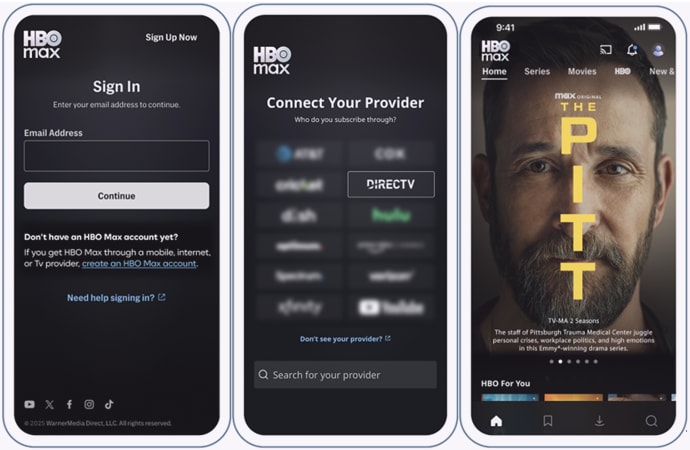
Streaming on the HBO Max app requires a high-speed internet connected device to stream content.
Troubleshoot viewing issues with the HBO Max app
- Make sure your device is connected to the internet.
- Internet download speed can affect your viewing experience. We suggest these internet download speeds: 8Mbps per stream in-home, or 2.5 to 7.5 Mbps mobile on-the-go. Test Your Internet Speed.
- Check if your device has the latest operating version.
- Check if the HBO Max app needs an update.
- If other apps or channels are working on your device, the issue may be isolated to the HBO Max app. Refer to HBO Max Help Center for additional information.